Runs on your own Twilio, SignalWire, Telnyx, OpenAI, Gemini, Claude, ElevenLabs and Deepgram accounts, so you keep your numbers, your keys and your costs in view.
Live call · Inbound00:12
Front desk agentCaller +216 •• ••• 482
AgentGood afternoon, you have reached the front desk assistant. How can I help?
CallerI need to move my appointment to next week.
AgentOf course. I have noted it, and the team will call you back to confirm a new time.
Note savedCallback · Tue 10:30Handoff ready
Example conversation. The actions shown are ones an agent can take.
Works with the services you already use
Twilio
SignalWire
Telnyx
Plivo
Vonage
Asterisk
FreeSWITCH
OpenAI
Google Gemini
Deepgram
ElevenLabs
Qwen
Claude
One workspace
Answer, call out and hand over from one place
Voice agents, call campaigns and your team share the same contacts, consent records and history, so nothing falls between tools.
Agents that pick up and call out
Put an agent on inbound calls after hours or all day, and let it place outbound calls and callbacks.
A phone line carries the call, then your agent hears, thinks and speaks. Choose the provider for each layer, or one engine that does all three. TuniCall shows what is connected and what is still missing.
Phone lineTwilioCarries the call
HearingDeepgramSpeech to text
ThinkingAnthropic ClaudeReplies and actions
SpeakingElevenLabsText to voice
Each layer can use a different provider, and you can switch one without touching the others.
Automation
Watch a campaign run itself
Pick an example. The audience is checked for consent, calls go out inside your hours and budget, the agent talks and takes action, and every outcome lands on the contact.
Audience and consent
Only contacts with a consent that matches the channel and purpose are kept.
Schedule and guardrails
Calls go out inside your hours and time zone, with retries and a daily spend cap.
Calls go out
Each call is placed, followed live and retried when nobody answers.
Conversation and actions
The agent talks, saves notes, updates statuses, creates callbacks or transfers.
Results
Every transcript, note and outcome is saved to the contact.
How it works
From your number to a working agent in three steps
Build your system
Pick a provider for each layer: phone line, hearing, thinking and speaking. Keys are encrypted, connections are tested against the real APIs, and you can switch later.
Shape your agent
Write its instructions, pick a language, voice and model, attach your documents, and choose what it may do: save notes, update statuses, create callbacks or transfer.
Launch and learn
Follow every conversation with transcripts, events and outcomes. Usage and spend are tracked against the limits you set.
Product tour
See the workspace your team will use
tunicall.com/app
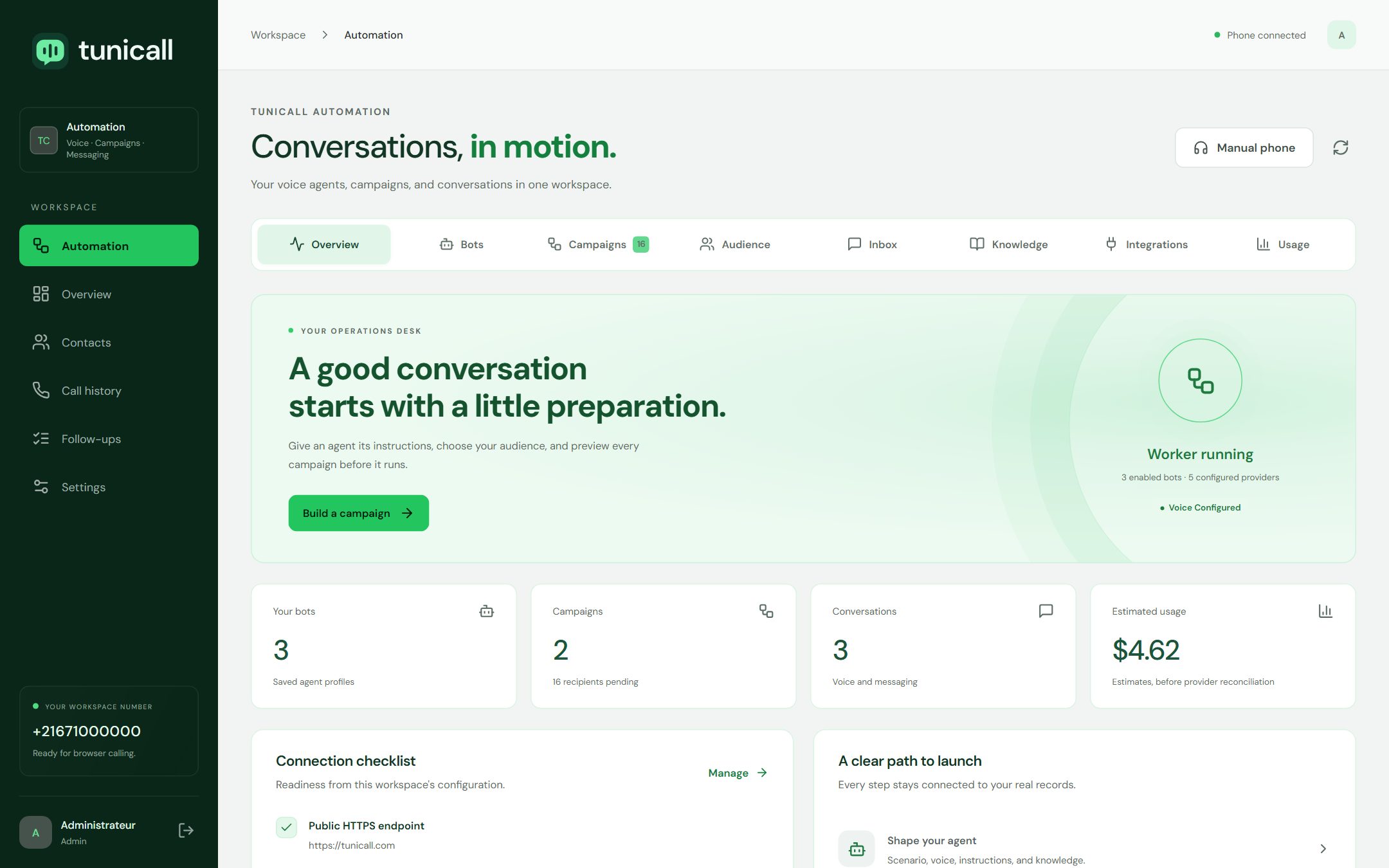
Your workspace at a glance: agents, campaigns, conversations and estimated usage, with a checklist of what is still missing before going live. Screens show demo data.
tunicall.com/app
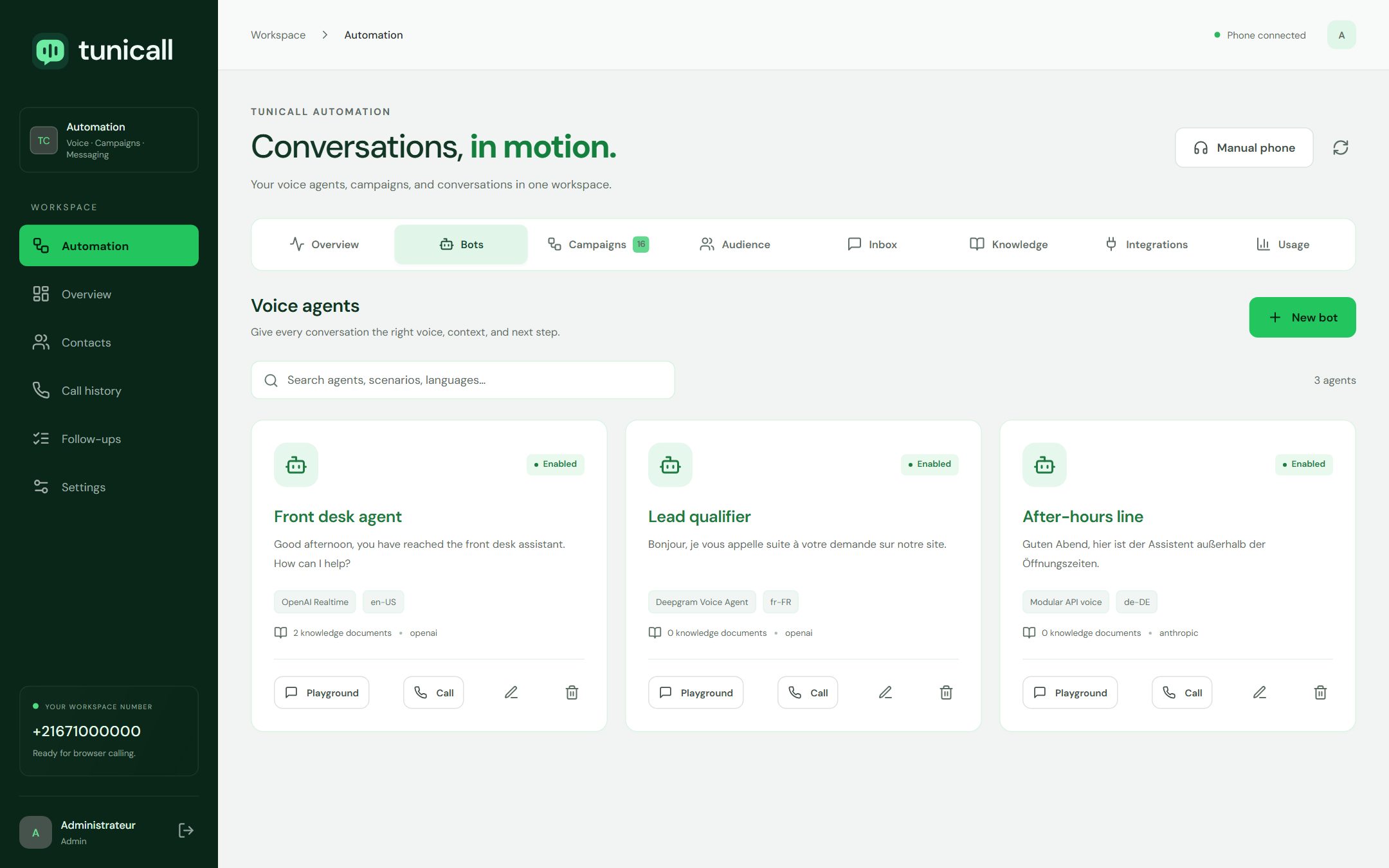
Each agent has its own instructions, language, voice, model, documents, time limit and allowed actions, and a text test you can run before any call. Screens show demo data.
tunicall.com/app
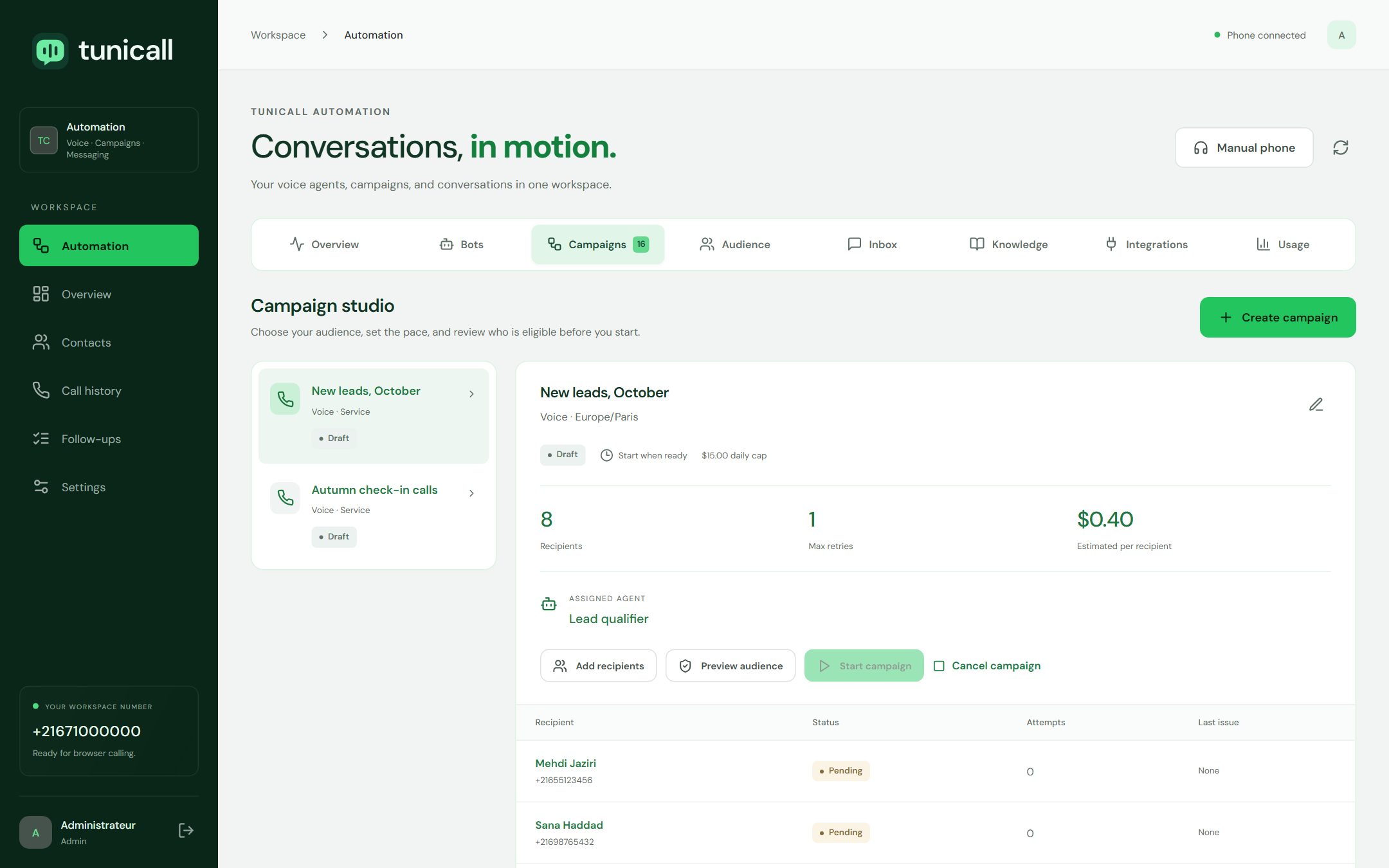
Campaigns combine an audience with consent, a schedule in your time zone, business hours, a spend cap and controlled retries. Screens show demo data.
tunicall.com/app
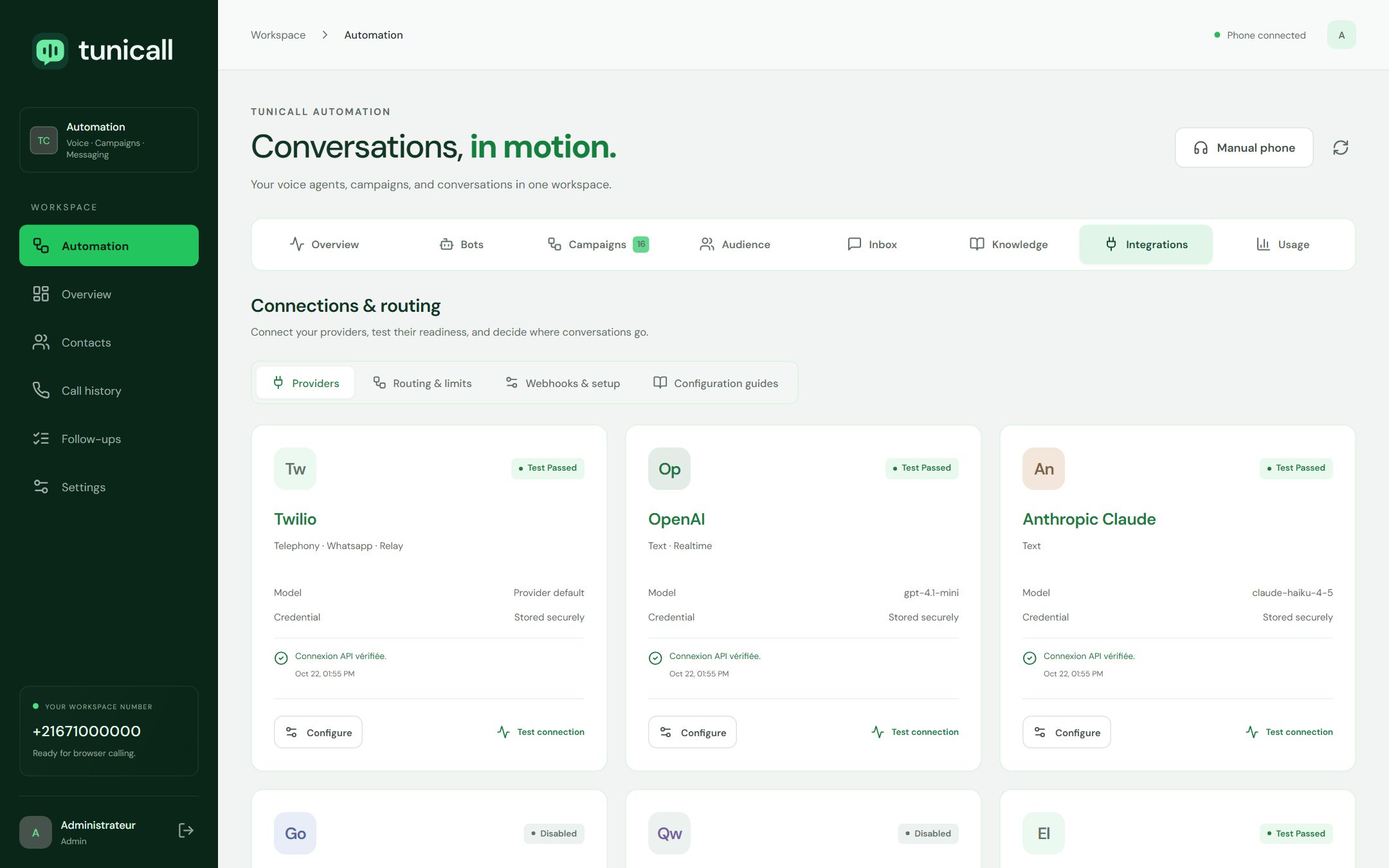
Provider keys are encrypted on the server, and every connection can be tested against the real API before you rely on it. Screens show demo data.
Built for real phone operations
Everything an automated phone line needs
Swap any layer
Phone line, hearing, thinking and speaking are separate layers. Change one and the rest keeps working.
The model you prefer
Claude, OpenAI, Gemini or any OpenAI-compatible endpoint such as Ollama or vLLM, on your own GPUs if you like.
Knowledge per agent
Attach documents to an agent. The context size is checked before every outbound call.
Actions, not only answers
Save notes, change a contact status, create a callback or ask for a transfer.
Human handoff
Transfer to an available person. If nobody can take the call, a callback request is kept.
Browser phone for your team
Inbound and outbound calls in the browser, with presence, keypad, notes and outcomes.
Hours and time zones
Campaigns only call inside the business hours and time zone you choose.
Spend caps and stop
Daily budgets and an emergency stop block new calls immediately.
Use cases
Start with the calls that cost you the most
Reception and after hours
Never send a caller to voicemail again: capture the reason, save a note and plan the callback.
Connect Twilio, SignalWire, Telnyx, Plivo, Vonage, Asterisk, FreePBX, FreeSWITCH or FusionPBX for calls, then choose how your agents hear, think and speak. Switch a provider at any time without rebuilding your agents.
Do I need my own phone line and AI provider accounts?
Yes. TuniCall connects to your accounts, so usage is billed by your providers at their own rates and you keep ownership of numbers, keys and data. Credentials are encrypted at rest.
Which phone systems can I use?
TuniCall connects to Twilio, SignalWire, Telnyx, Plivo, Vonage, Asterisk, FreePBX, FreeSWITCH and FusionPBX. See the integrations page for what each connector covers.
Which languages can the agents speak?
You set the language and voice of each agent. What is available depends on the engine you choose: speech-to-speech models cover many languages, and the Deepgram scenario ships default voices for English, French, German, Spanish, Italian, Dutch and Japanese.
Can a person take over a conversation?
Yes. Agents can request a transfer to an available team member or a number you choose. If nobody can take the call, a callback request is kept.
Can we keep our data on our own servers?
Yes. TuniCall can be self-hosted, and the Qwen scenarios run the language model, speech recognition and speech synthesis on your own GPU servers. Calls still travel through your telephony carrier.
How do campaigns handle consent?
Each recipient needs a recorded consent that matches the campaign channel and purpose, with its source. Recipients without one are excluded before anything starts, and you can preview the final audience.
Hear an agent handle your calls.
Tell us how your phone line works today. We will show you how a TuniCall agent would answer, follow up and hand over.
 Twilio
 SignalWire
 Telnyx
 Plivo
 Vonage
 Asterisk
 FreeSWITCH
 OpenAI
 Google Gemini
 Deepgram
 ElevenLabs
 Qwen
 Claude